Find out how to assign and manage user roles
As an admin, you have the ability to assign or update User roles
- By default, users will be added as a 'Basic' user
- Select 'Users' from the menu
- Locate the user you want to update
- Select the pencil next to the User
- Update the user role from the editing panel
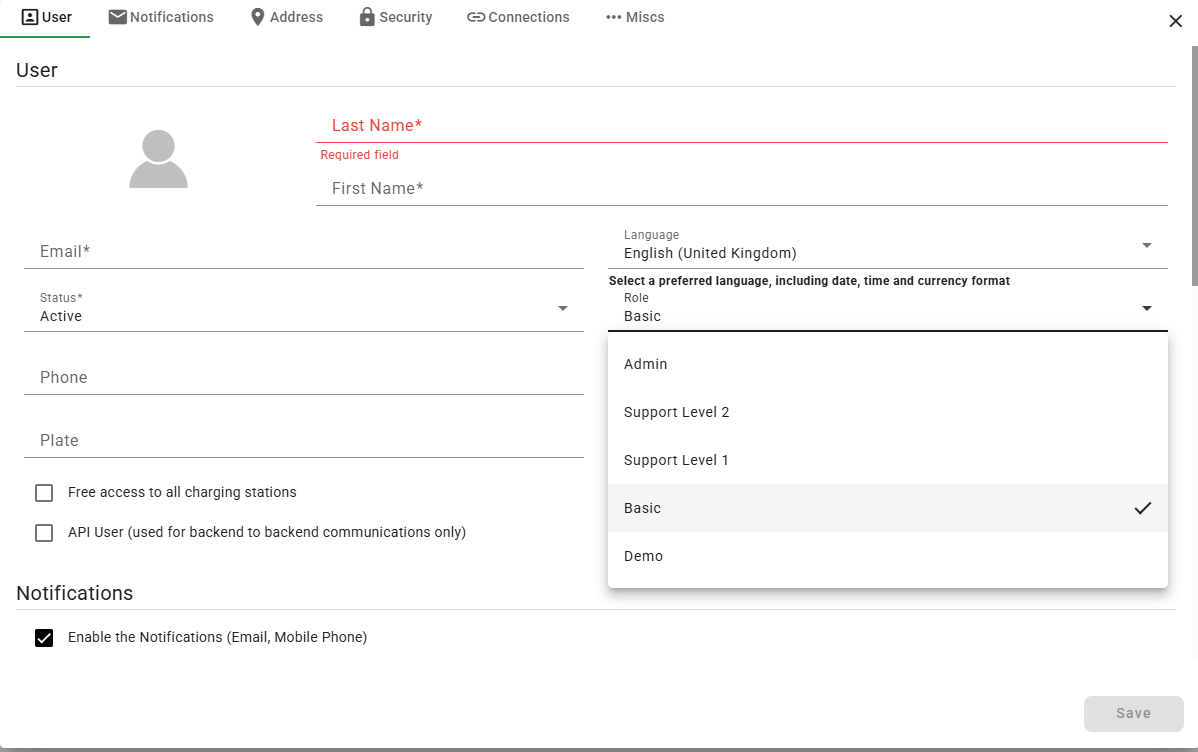
User Role Descriptions
|
Admin |
Access to all functions and sites across VEV-IQ |
|
Support Level 2 |
Deletion activities mostly prohibited, with most editing capabilities available. Some key creation activity also not available such as new charging stations, users, assets and sites. |
|
Support Level 1 |
Editing activities mostly prohibited, view only permissions |
|
Basic |
Can only edit information related to user account, can’t view other user information. |
|
Demo |
View only access to reporting and dashboard displays. Personal information anonymised |