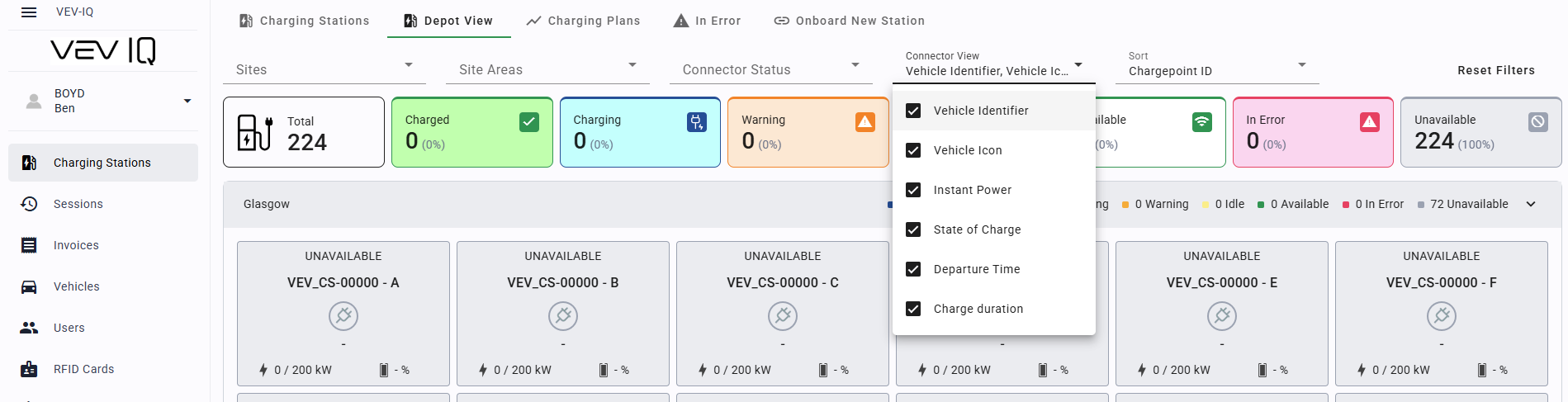
Display Depot View on monitors around your site to see a visual overview of your charging network on-site
Depot View gives a real-time site-wide charging status, showing key metrics like charger availability and warnings. Designed for control rooms, it helps operators monitor and manage the network efficiently.
Find Depot View in VEV-IQ
- Navigate to 'Charging Stations'
- Select 'Depot View' tab at the top of the page
- Configure the filters to suit your depot
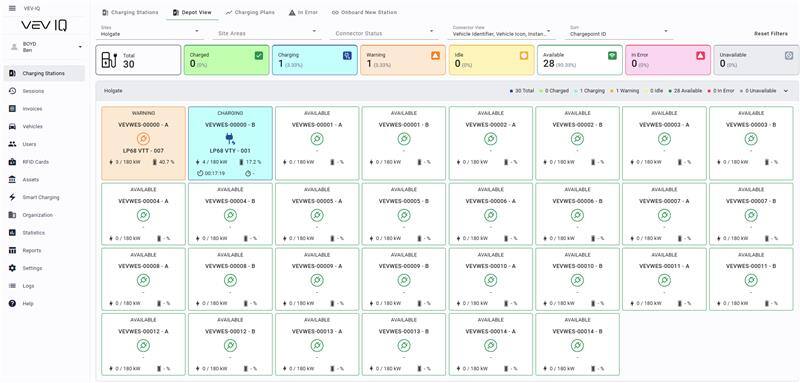
Headline Stats
Charged: Session has completed with SOC above 80%
Charging: The vehicle is currently charging.
Warning: Issue identified with the session, such as low charging speed
Idle: The vehicle is plugged in but not receiving any power, for example if it is preparing or finishing, or has been suspended due to smart charging
Available: The connector is ready to be plugged in.
In Error: The connector has a fault and cannot be used.
Unavailable: The connector is offline, either intentionally or due to internet or power issues

Connector Widget
Status: Current status of the connector
Charger Name: The name of the charging station.
Vehicle Identified: Vehicle licence plate (if RFID)
Power: If the power is low or 0, there may be an issue with charging.
Battery: Monitor the vehicle's state of charge (SOC)