![VIT06-Logo-Redesign-CMYK-1.jpg]](https://help.vev.com/hs-fs/hubfs/VIT06-Logo-Redesign-CMYK-1.jpg?height=40&name=VIT06-Logo-Redesign-CMYK-1.jpg)
Sometimes, there may be faults on the chargers. VEV-IQ will notify you of this, and there are some steps to triage and resolve this yourself, or you can request support from VEV
Disconnected Chargers
- On the 'Charging Stations' page, disconnected chargers will appear dark grey with a red "disconnected" label
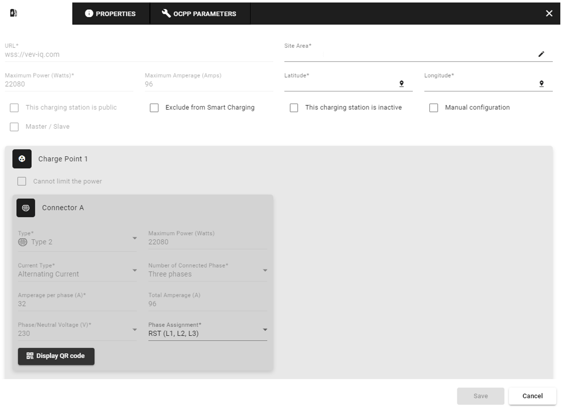
Check if the Charger is Marked Inactive
- Go to 'Charging Stations'
- Click the
 pencil icon next to the disconnected charger
 - Ensure the “This charging station is inactive” box is unchecked
Verify Internet Connection and Power
- If the charger remains disconnected, check the site’s internet connection and power supply
- You may need to reset the router or restore power on-site
Contact Field Engineer
- If the above steps don’t resolve the issue and you have VEV’s Assurance package, a Field Engineer will be dispatched to fix the problem
Faulted Chargers
- On the 'Charging Stations' page, the connector will appear in red

Investigate the Error
- Go to 'Charging Stations'
- Click the down arrow 🔽 next to the faulty connector
- Review the information provided by the charging station

Remote Reset the Charger
- Click the 'three dots' next to the charger
- Select 'soft reset' to restart the software
- If the issue persists, select 'reboot' to restart the hardware
Request VEV Support
You can contact VEV support via the following methods:
- Email: support@vev.com
- Helpline: +44 770 016 0424
- Service Director: iain.dyer@vev.com